
Optimizing 2D and 3D Assets for Mobile Slots: WebGL Performance Guide
A slot game loses players in two situations: when it takes too long to load or when it starts to freeze during gameplay. Unoptimized graphics deliver a double blow — they inflate startup time and overload the system during gameplay. For this reason, optimizing slot games must address both issues simultaneously: speeding up startup and ensuring stable rendering on mobile devices.
How do initial load times and memory spikes affect mobile player drop-off?
Sudden freezes or tab crashes result from memory spikes caused by bloated textures and the simultaneous triggering of multiple effects. When the duration of animations and rendering exceeds the frame time budget of 16.7 ms, a stable 60 FPS breaks down into stutters. To identify such performance drops, we use PaintPool Studio to test graphics in the most demanding scenes – where multiple animated characters and visual effects appear simultaneously.
Texture atlases, compression formats, and VRAM management
The amount of video memory occupied by textures and graphic assets is defined as the VRAM memory footprint. This metric is optimized by consolidating texture atlases, trimming empty areas at the edges, and applying basic graphics compression.
What is the optimal texture atlas size for mobile HTML5 slot games?
A size of 2048 × 2048 pixels is considered a convenient benchmark for mobile HTML5 slots: it accommodates a large number of sprites and is supported by most devices. However, on budget smartphones, the final limitations are dictated by the combination of the GPU, browser, and engine.
Proper texture atlas packing allows for more compact placement of elements. Using power-of-two textures (1024 × 1024 or 2048 × 2048 pixels) ensures better compatibility with graphics hardware, although modern WebGL already supports other resolutions as well.
How do the ASTC and ETC2 compression formats reduce GPU memory usage?
Thanks to block-based compression in ASTC and ETC2, textures take up significantly less space in VRAM. ETC2 stands out for its versatility and stable performance on most mobile systems, although it is limited by a fixed grid. ASTC adds flexibility: by changing the block size, you can maximize sharpness or minimize file size.
Spine 2D optimization: Bones, meshes, and draw call reduction
In Spine 2D, the load is increased by complex deformation meshes, excess masks, and incompatible blending modes. Proper spine 2D optimization helps eliminate unnecessary calculations on mobile devices in advance. Draw call batching combines compatible graphics operations, reducing the number of commands sent to the GPU. Different textures and blending modes can disrupt batching.
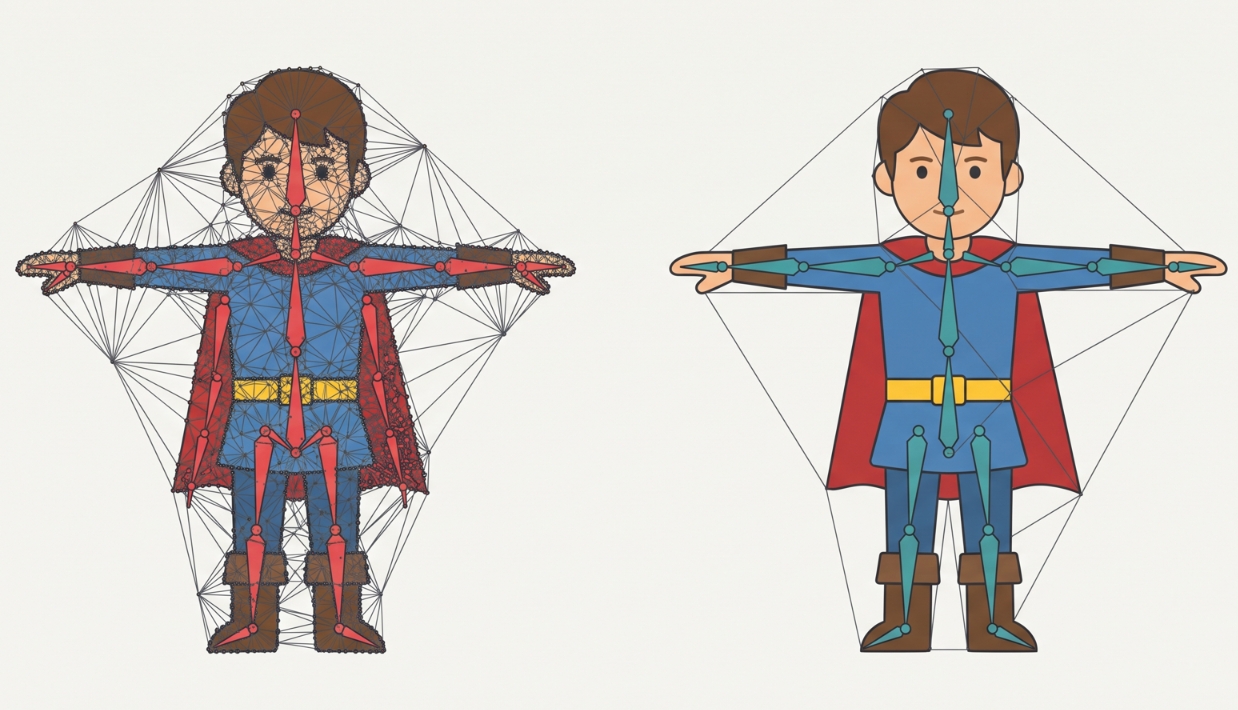
How many vertices and bones are too many for a mobile slot character?
The more vertices involved in deformation, the more computations are required to change the mesh’s shape. During polygon mesh deformation, retain vertices at bend points and silhouette changes. Unnecessary vertices can be removed as long as the shape and movement remain smooth. The number of bones should match the animation, and the acceptable complexity should be tested on lower-end target smartphones with multiple simultaneously animated characters.
Why does improper layer ordering cause excessive draw calls in WebGL?
If you mix up the layer order or overuse masks and blending modes, the engine will be unable to form a single batch, which will immediately increase draw calls. Clipping operations create additional clipping mask overhead. Therefore, when working with the PixiJS rendering pipeline, verify the layer sequence, shared texture sources, and blending modes. Implementing Alpha overdraw reduction involves trimming duplicate effects, background semi-transparent overlays, and invisible layers that only weigh down the scene.
Integrating 3D assets into 2D slot pipelines without killing mobile FPS
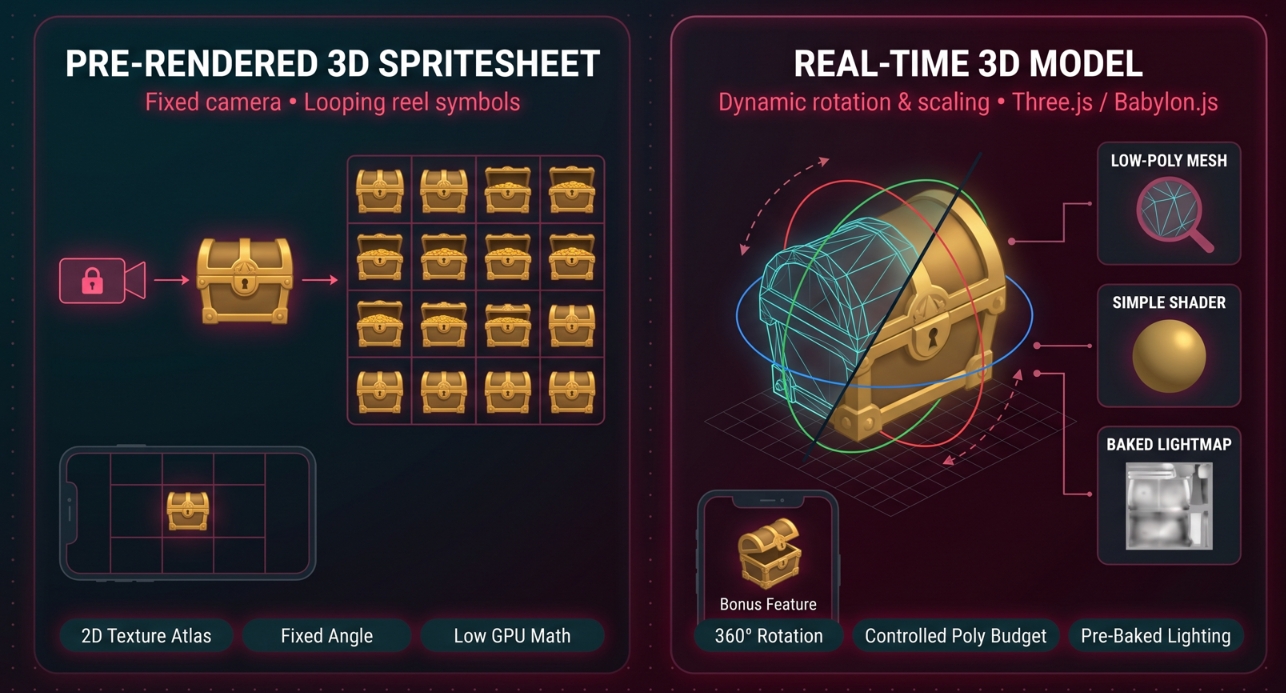
The choice between 3D rendering techniques directly affects your slot’s performance. Pre-rendered spritesheets reduce the cost of drawing geometry, while real-time 3D allows for real-time camera movement without increasing the frame count.
When should studios use pre-rendered 3D spritesheets versus real-time 3D models?
Pre-rendered spritesheets are suitable for standard looping animations with fixed cameras, replacing computational resources with simple texture data. Real-time 3D graphics should only be used for objects that actively rotate, scale, or change their position in space.
For models in Three.js or Babylon.js, monitor the following:
- Number of polygons: depends on the model’s size on screen and the number of visible objects.
- Materials and shaders: complex settings increase the load.
- Lighting: baked lighting maps store lighting effects in textures instead of performing dynamic calculations for static objects.
A sound approach to optimizing slots allows you to maintain high detail even under strict constraints – you can see this for yourself and view examples of our work in the our projects section.
Testing and profiling art assets before handoff to the game engine
Test graphics in the target engine and on smartphones with varying performance levels:
- FPS and frame time;
- peak RAM and VRAM usage;
- number of draw calls;
- resource load times;
- smoothness of simultaneous animations and effects.
Also check exported files, rig functionality, and texture quality after compression.
Get engine-ready, high-performance slot art with Paintpool Studio
Paintpool Studio prepares graphics for mobile slots while accounting for WebGL and browser engine limitations. Our services include:
- texture atlas optimization;
- preparation of Spine rigs and deformation meshes;
- creation of pre-rendered sprite sheets;
- optimization of low-poly 3D models;
- file verification and export.
We deliver clean assets ready for integration. To order our game art services, let us know which engine your project is built on and for which devices you’re optimizing the graphics – and we’ll help bring your vision to life as a high-quality game product.


