
Designing Bonus Rounds and Free Spins: Visual Transitions That Keep Players Engaged
Engaged When two scatters hit the reels, players hold their breath waiting for that third one. In slot bonus round design, you can crank up the tension right here with smart lighting effects and symbol animations. Once the bonus actually triggers, an animation sweeps across the screen for about 1.5 seconds, masking the scene change underneath. The player drops straight into Free Spins with a fresh backdrop and an updated UI—no loading screens, no awkward pauses.
Why visual transitions between base game and bonus rounds dictate player excitement
That third scatter is the climax of the entire spin. If the reels just blink out and a brand-new screen abruptly pops up, the whole payoff falls flat. The environment needs to react to what just happened: the lighting shifts, heavy doors swing open, or the game’s mascot ushers you into the bonus round. Done right, a slot game scene transition animation stops feeling like a technical cut and starts feeling like part of the story.
How do seamless scene transitions prevent cognitive drop-off during feature triggers?
A smooth transition keeps the mental link between landing the scatter and entering the bonus intact. Players don’t have to waste a second re-orienting themselves: the reels and spin buttons stay right where they left them, only now the world behind them has changed. The free spins counter pops up immediately, so the next move is completely obvious.
Building anticipation: Scatter teases and pre-bonus visual escalation
The suspense actually starts before that third symbol even lands. A good scatter anticipation tease pulls the player's eyes straight to the final reel the moment the first two scatters lock in. The artist’s job here is to heighten that uncertainty without making false promises about a win before the game logic actually confirms it.
During the Slot game art services phase, it pays off to sit down with the game designer early and map out symbol states, reel reactions, and exact trigger timings. Otherwise, you end up awkwardly retrofitting visual effects to match the math after the animation is already finished.
What visual cues make a third scatter reel spin feel genuinely suspenseful?
When it all comes down to one last reel, highlighting its frame and briefly kicking up the spin speed works wonders. Dimming the other symbols slightly helps too, while the two scatters already on the board keep pulsing softly. All eyes are locked on that final reel, waiting to see where it stops. The third symbol isn't there yet—but at any split second, it could drop.
For scatter trigger animation slots, you really need two distinct outcomes ready to go. If that third scatter hits, all three symbols flare up and launch the bonus. If it misses, the glow gradually fades out, the reels settle back into their baseline state, and the base game rolls on.
Architecting the transition sequence: Camera work, portals, and Spine 2D effects
In a slot game scene transition animation, you can easily hide a full scenery swap behind a quick flash or a slick camera move. While the player is watching the animation play out, the engine is quietly swapping in preloaded background assets behind the scenes. The effect clears, and a whole new location is already sitting behind the reels - no black screens, no "loading" text. Spine 2D portal effects are great for pulling this off: a portal tears open right over the reels, a burst of particles fills the frame, and the new setting emerges as the smoke clears.
A solid VFX services team will always dial in the intensity of these effects to match the slot's specific vibe, rather than throwing in blinding flashes just for the sake of spectacle.
How long should a slot bonus transition last before players want to skip?
You usually want to budget around 1.5 to 2.5 seconds for a scene swap. That’s plenty of time to run a full screen wipe animation - say, a bright wave of energy or a cloud of particles sweeping across the display to briefly cover the reels before revealing the new backdrop. Making players wait any longer before their first free spin rarely does the game any favors.
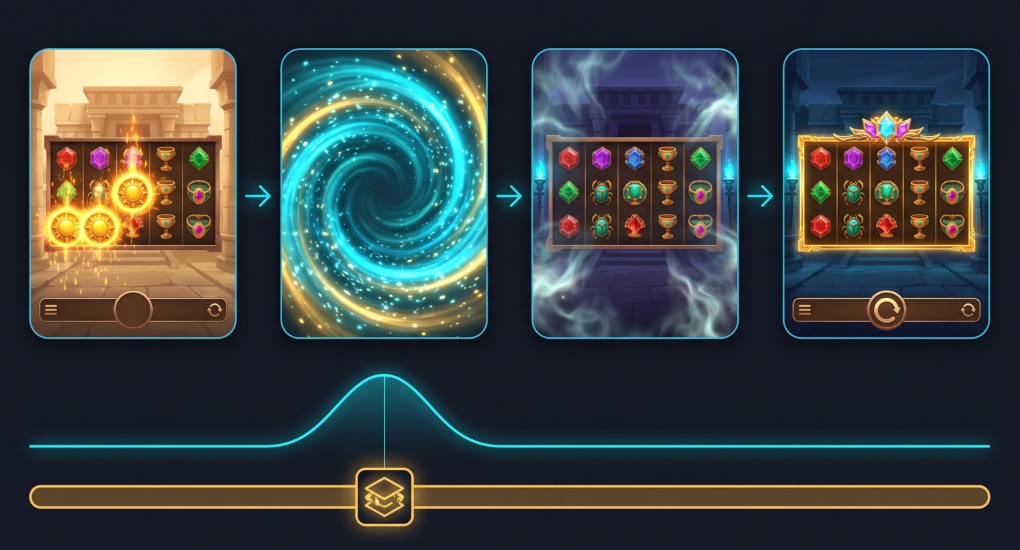
With a camera zoom transition, you can fly straight through a set of open doors or dive into a portal. Another classic trick is having the mascot step right up to the lens, briefly blocking the entire view before stepping aside to reveal the new scene underneath.
How to transition from day to night or shift environments using shared texture atlases?
Switching a scene from day to night doesn't mean you have to repaint the whole environment from scratch. For an environmental state shift, tweaking the lighting, changing the sky color, and updating a few recognizable landmarks—like lit-up windows, darker foliage, and distant city lights—does the heavy lifting.
When it comes to WebGL memory management, it’s much smarter to keep your base layers inside shared texture atlases and simply recolor them using shaders. You can swap out the sky, building lights, and a handful of background details separately while keeping the core textures untouched. That way, the night mode doesn't force the game to load a massive batch of new image files, keeping video memory overhead nice and low.
Redesigning the bonus environment: Differentiating Free Spins from the base grid
Once players enter Free Spins, changing the banner above the reels is just the start – you can transform the entire surrounding space. For free spins visual transitions, a darker, moodier backdrop paired with vibrant lighting accents usually hits the mark. Giving the reel frame a makeover with glowing edges or fresh decorative trim also sells the shift. Meanwhile, keeping the symbols, buttons, and counters locked in their usual spots lets players jump straight back into the action without missing a beat.
What UI and background changes signal high-volatility potential in Free Spins?
Free Spins should look different from a regular spin, but players still need to recognize the game they're playing. Three visual changes help make the bonus feel more intense without cluttering the screen:
- UI elements. Bold multipliers, a high-contrast free spins counter, and stronger win reactions work as high volatility visual cues. They should reflect the slot's actual math, though, rather than suggest better winning odds that aren't there.
- Background. With background color grading, artists can shift the scene toward cooler, darker, or deeper tones. Bright multiplier numbers and particle effects stand out more against these colors, as long as the reel symbols and UI text remain easy to read.
- Reel frame. A reel frame transformation can replace a plain metallic border with glowing facets, intricate patterns, or pulsing energy inserts. The grid's dimensions and mechanics stay the same, so players don't have to get used to a new layout.
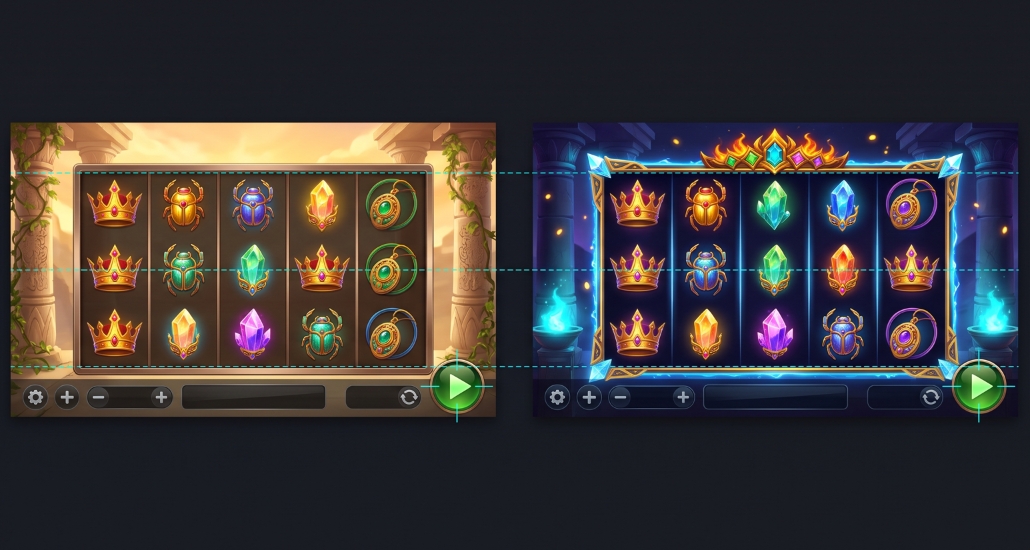
At Paintpool Studio, environment artists build out the bonus worlds, UI designers fine-tune the interface states, and VFX animators stitch the transitions together in Spine 2D. Everything is crafted as one cohesive scene rather than a pile of disconnected effects.
Through 2D animation services, the studio delivers production-ready assets tailored straight to the client's engine—complete with clean file structures, optimized atlases, and clearly defined states ready for smooth integration.
Ultimately, this pays off in stronger session depth retention: players stay locked into the flow, and the bonus round lands like a seamless, high-impact event without any pace-killing pauses.


